Meet the Battery
What's inside a battery? How does it push electrons through a wire? Join Nitvi as she opens up the world's most important electronics component!
Everything in electronics needs power. And the most common power source of all is the battery! 🔋
But have you ever wondered — what’s actually inside a battery? How does this small thing push electrons through a wire and make an LED light up?
Let’s find out! 🔍
What Is a Battery? 🤔
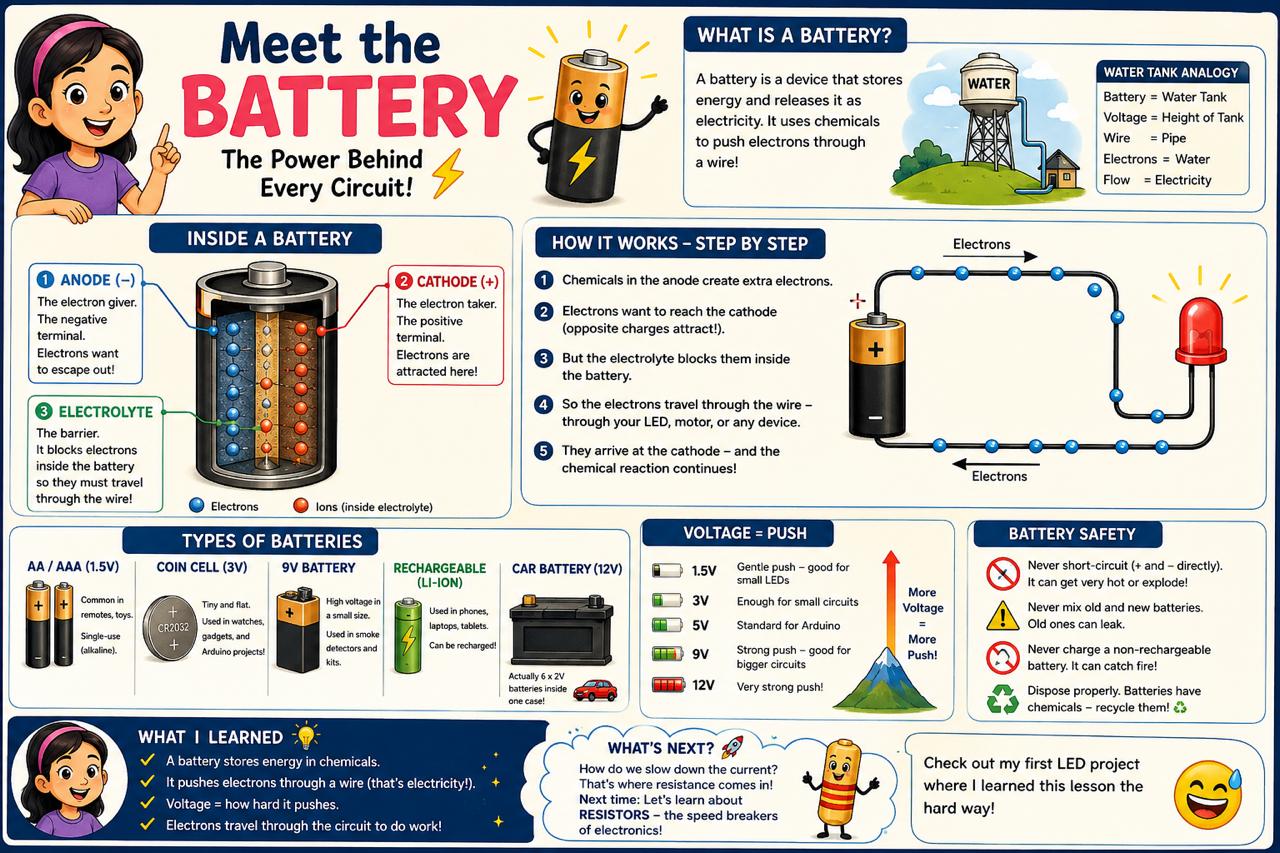
A battery is a device that stores energy and releases it as electricity. Think of it like a water tank on a hill — the water is stored up high, and when you open the tap, gravity pushes the water down through the pipe.
A battery does the same thing, but instead of water and gravity, it uses chemicals to push electrons through a wire! 🧪⚡
Inside a Battery 🔬
Every battery has three main parts:
1. Anode (−) — The Electron Giver
The negative terminal. Inside, there’s a chemical that wants to lose electrons. Think of it like a crowded room — the electrons want to escape out the door!
2. Cathode (+) — The Electron Taker
The positive terminal. This side wants to receive electrons. It’s like an empty room with a big “VACANCY” sign — electrons are attracted to it!
3. Electrolyte — The Barrier
A chemical paste or liquid in the middle. It stops electrons from going straight from anode to cathode inside the battery. Instead, the electrons have to go the long way — through the wire and your circuit! That’s what makes the electricity flow! 🔄
How It Works — Step by Step ⚡
- The chemicals in the anode create extra electrons
- The electrons want to reach the cathode (opposite charges attract!)
- But the electrolyte blocks them inside the battery
- So the electrons travel through the wire — through your LED, motor, or whatever is connected
- They arrive at the cathode — and the chemical reaction continues!
This flow of electrons through the wire? That’s electricity! 🎉
The Water Tank Analogy 💧
Remember how I learned that electricity is like water?
| Battery Part | Water Analogy |
|---|---|
| Anode (−) | Bottom of the water tank — water wants to flow out |
| Cathode (+) | Ground level — water flows toward here |
| Voltage | How high the tank is — higher = more push! |
| Wire | The pipe connecting the tank to the ground |
The “height” of the tank is the voltage — a 9V battery is like a taller tank than a 1.5V battery. More voltage = more push! 💪
Types of Batteries 🔋
Not all batteries are the same! Here are the ones I see most:
AA / AAA Batteries (1.5V)
The ones in TV remotes and toys. Small but mighty! These are single-use (alkaline) — once the chemicals are used up, they’re done.
Coin Cell Batteries (3V)
Tiny flat circles inside watches and small gadgets. The CR2032 is super common in Arduino projects!
9V Batteries
The rectangular ones with two clips on top. Lots of voltage in a small package! Often used in smoke detectors and old electronics kits.
Rechargeable Batteries (Li-ion)
The ones inside your phone, laptop, and tablet! These can be recharged — the chemical reaction goes backwards when you plug them in! 🔌
Fun fact: A car battery is actually six 2V batteries connected together inside one case — that’s why it’s 12V! 🚗
Battery Safety ⚠️
Batteries are generally safe, but there are a few rules I always follow:
- Never short-circuit — don’t connect + and − directly with a wire. The battery gets very hot and can leak or explode!
- Never mix old and new batteries — the old ones can leak and damage your device
- Never charge a non-rechargeable battery — it can catch fire!
- Dispose properly — batteries have chemicals, so don’t just throw them in the trash. Look for battery recycling! ♻️
Voltage = Push 💪
The most important thing to know about a battery is its voltage:
- 1.5V (AA/AAA) — gentle push, good for small LEDs
- 3V (coin cell) — enough for small circuits
- 5V (USB power) — standard for Arduino
- 9V — strong push, good for bigger circuits
- 12V (car battery) — very strong push!
Higher voltage doesn’t mean “more electricity” — it means more push. Like a taller water tank — the water comes out faster! 🏔️
What I Learned 📝
A battery is like a chemical water tank:
- It stores energy in chemicals
- It pushes electrons through a wire (that’s electricity!)
- Voltage = how hard it pushes
- The electrons travel through your circuit to do work (light an LED, spin a motor, etc.)
What’s Next? 🚀
Now I know what batteries are and how they push electrons. But how do we control that push? What if the battery pushes too hard and our LED burns out?
🤔 How do we slow down the current? That’s where resistance comes in!
Next time, I’ll learn about resistors — the speed breakers of electronics! Check out my first LED project where I learned this lesson the hard way! 😅
Join me on Nitvi Talks — 👍 Like, 💬 Comment, 🔔 Subscribe!
See you next time! ⚡🔋